
16-Way Switch Capacitive Touch Module
| รหัสสินค้า | AG00196 |
| หมวดหมู่ | Joystick/Keypad/Touch Keypad |
| ราคา | 70.00 บาท |
| สถานะสินค้า | พร้อมส่ง |
| จำนวน | ชิ้น |
หยิบลงตะกร้า

รายละเอียดสินค้า
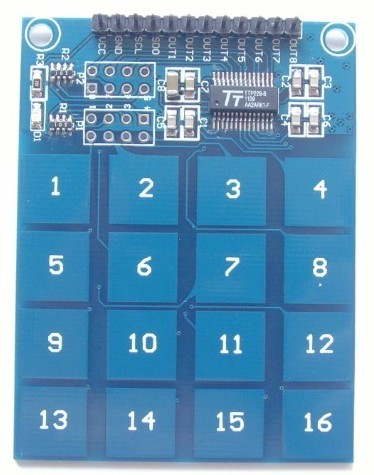
16-Way Swith Capacitive Touch module (TTP229)
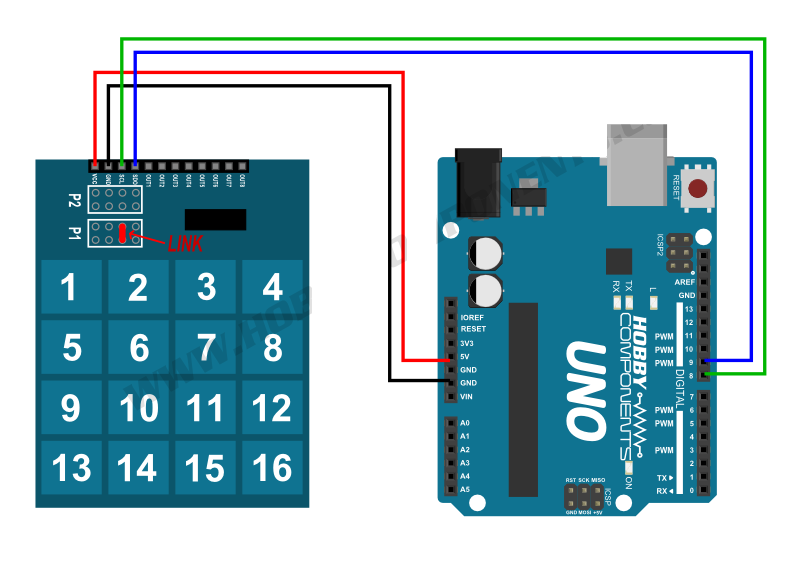
โมดูล touch switch ทำหน้าที่เป็นสวิตซ์สัมผัส เราสามารถอ่านค่า touch switch โดยใช้ขาควบคุมจากบอด Arduino แค่สองสาย ทำให้ประหยัดขาใช้งานไปได้เยอะเลย
ตัวอย่างการต่อ
 ตัวอย่าง Arduino Code
 /* Define the digital pins used for the clock and data */
#define SCL_PIN 8
#define SDO_PIN 9

/* Used to store the key state */
byte Key;

void setup()
{
/* Initialise the serial interface */
Serial.begin(9600);
/* Configure the clock and data pins */
pinMode(SCL_PIN, OUTPUT);
pinMode(SDO_PIN, INPUT);
}


/* Main program */
void loop()
{
/* Read the current state of the keypad */
Key = Read_Keypad();

/* If a key has been pressed output it to the serial port */
if (Key)
Serial.println(Key);

/* Wait a little before reading again
so not to flood the serial port*/
delay(100);
}


/* Read the state of the keypad */
byte Read_Keypad(void)
{
byte Count;
byte Key_State = 0;

/* Pulse the clock pin 16 times (one for each key of the keypad)
and read the state of the data pin on each pulse */
for(Count = 1; Count <= 16; Count++)
{
digitalWrite(SCL_PIN, LOW);

/* If the data pin is low (active low mode) then store the
current key number */
if (!digitalRead(SDO_PIN))
Key_State = Count;

digitalWrite(SCL_PIN, HIGH);
}

return Key_State;
}
ข้อมูลเพิ่มเติม
http://itimewaste.blogspot.com/2014/12/arduino-code-for-ttp229-touch-16-button.html
คลิปตัวอย่างสาธิตการใช้งาน
วิธีการชำระเงิน
ชำระเงินค่าสินค้าโดยการโอนเงินเข้าบัญชีธนาคาร KBANK, SCB, BBL,TMB
กรุณาเก็บหลักฐานการโอนเงินของท่านไว้เพื่อแจ้งการชำระเงินด้วยค่ะ
ท่านสามารถแจ้งการชำระเงินผ่านระบบอัตโนมัติได้โดย Click Link ข้างล่างค่ะ
https://www.arduitronics.com/informpayment
ชำระเงินผ่านธนาคาร
 บมจ. ธนาคารกสิกรไทย
สาขาเซ็นทรัล แจ้งวัฒนะ ออมทรัพย์
บจก. จีเจ เทค
054-3-24957-2
บมจ. ธนาคารกสิกรไทย
สาขาเซ็นทรัล แจ้งวัฒนะ ออมทรัพย์
บจก. จีเจ เทค
054-3-24957-2
 ธนาคารไทยพาณิชย์ จำกัด (มหาชน)
สาขาเซ็นทรัล แจ้งวัฒนะ ออมทรัพย์
บจก. จีเจ เทค
429-032188-8
ธนาคารไทยพาณิชย์ จำกัด (มหาชน)
สาขาเซ็นทรัล แจ้งวัฒนะ ออมทรัพย์
บจก. จีเจ เทค
429-032188-8
 ธนาคารกรุงเทพ จำกัด (มหาชน)
สาขาเซนทรัล พระราม 3 สะสมทรัพย์
บจ. จีเจ เทค
086-7-268583
ธนาคารกรุงเทพ จำกัด (มหาชน)
สาขาเซนทรัล พระราม 3 สะสมทรัพย์
บจ. จีเจ เทค
086-7-268583
 ธนาคารทหารไทยธนชาต จำกัด (มหาชน)
สาขาเซนทรัล พระราม 3 กระแสรายวัน
บจก. จีเจ เทค
2121057935
ธนาคารทหารไทยธนชาต จำกัด (มหาชน)
สาขาเซนทรัล พระราม 3 กระแสรายวัน
บจก. จีเจ เทค
2121057935


@rfm0967y
ติดต่อสอบถาม

Join เป็นสมาชิกร้านค้า

ร้านArduitronics
/www.arduitronics.com/
สมัครสมาชิกร้านนี้ เพื่อรับสิทธิพิเศษ
MEMBER


สินค้าในตะกร้า ({{total_num}} รายการ)

ขออภัย ขณะนี้ยังไม่มีสินค้าในตะกร้า
ราคาสินค้าทั้งหมด
฿ {{price_format(total_price)}}
- ฿ {{price_format(discount.price)}}
ราคาสินค้าทั้งหมด
{{total_quantity}} ชิ้น
฿ {{price_format(after_product_price)}}
ราคาไม่รวมค่าจัดส่ง
➜ เลือกซื้อสินค้าเพิ่ม